How to Use Kepwam Self Heating Coffee Mug T2?

How to Clean House Gem Coffee Mug Warmer
September 20, 2026
How to Use Kitchekshop Coffee Warmer
September 20, 2026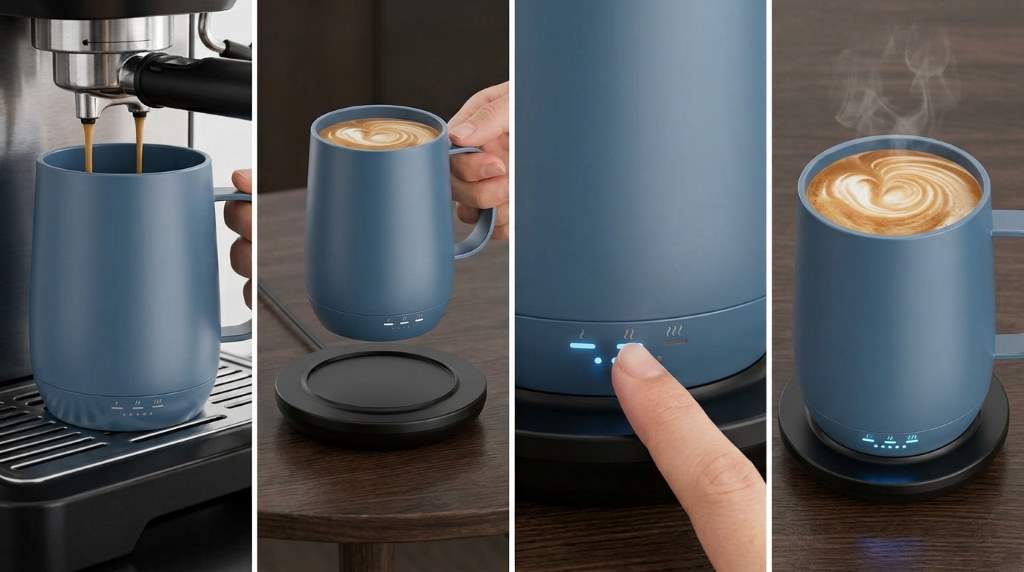
To use the Kepwam Self Heating Coffee Mug T2, fully charge it, add your drink, power it on, and select a temperature. The mug holds 16 ounces and offers three settings, with the highest reaching 149°F for controlled everyday warming.
If you want consistent heat without an app, this mug keeps the process simple. The Kepwam Self Heating Coffee Mug T2 combines a rechargeable battery, charging coaster, physical button, and smart display.
Key Takeaways
- Fully charge the mug before your first use and before longer sessions.
- Use the single button to power the mug and cycle through temperature settings.
- Use the lid whenever possible because it helps reduce heat loss and improve battery efficiency.
- Keep the mug on its charging coaster when you want continuous warming at your desk.
- Hand wash the mug and lid, and never submerge the electrical base.
- Keep the mug and charging contacts completely dry before charging.
What You Need Before Using the Mug
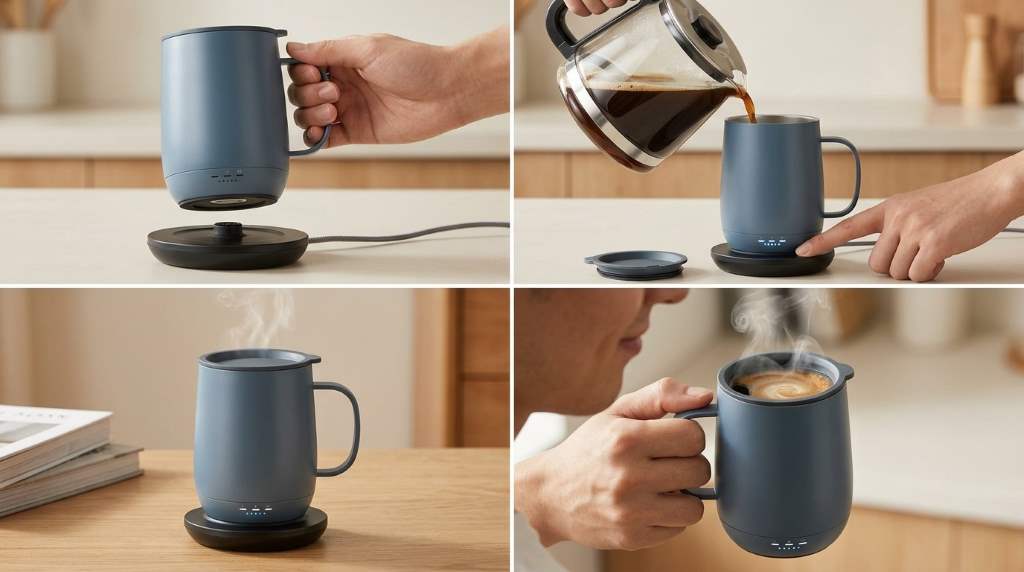
The T2 comes with the heated mug, charging coaster, power adapter, and sliding lid. Before starting, place the coaster on a stable, dry surface near a suitable power outlet.
Next, inspect the mug and charging contacts for moisture or residue. Because the T2 contains electronic components and a rechargeable battery, dry connections support safer and more reliable charging.
Check the Model Before Setup
Kepwam sells several heated mug models, so confirm that your unit matches the TCM2 or T2 designation. This matters because other Kepwam models can have different capacities, controls, or battery specifications.
For the T2, the documented capacity reaches 16 ounces, while the maximum temperature reaches 149°F. Therefore, avoid applying instructions from another Kepwam model without checking its specific manual.
How to Charge the Kepwam T2
Start by connecting the supplied power adapter to the charging coaster. Then place the mug squarely on the coaster so the charging contacts align correctly.
Allow the mug to charge fully before its first use. A full charge gives you more flexibility when you want to use the mug away from the coaster.
How to Get a Reliable Charge
First, keep both the coaster and mug base completely dry. Then make sure the mug sits evenly rather than resting at an angle.
If charging does not begin, remove the mug and inspect the contact points. Wipe them with a dry, soft cloth, reconnect the coaster, and position the mug again.
Also, use the supplied charging equipment rather than experimenting with an incompatible adapter. This approach reduces avoidable charging and electrical problems.
How to Use the T2 Step by Step
Once the battery has enough charge, prepare your coffee, tea, hot chocolate, or another suitable beverage. Pour it into the mug without exceeding the maximum fill level.
Afterward, secure the sliding lid if you want better heat retention. Then press and hold the power button until the mug activates.
- Place the charged mug on a dry, stable surface.
- Pour your prepared beverage into the mug.
- Keep the liquid below the maximum capacity mark.
- Attach the sliding lid securely.
- Press and hold the power button to turn the mug on.
- Short press the button to cycle through temperature settings.
- Watch the display to confirm your selected setting.
- Return the mug to the coaster for extended warming.
How to Set the Right Temperature
The T2 provides three temperature settings: 113°F, 131°F, and 149°F. Each setting suits a different drinking preference and warming requirement.
| Setting | Temperature | Best Use |
|---|---|---|
| Warm | 113°F | Slow sipping and gentle warmth |
| Hot | 131°F | Everyday coffee and tea |
| Piping | 149°F | Maximum available warming |
For longer battery use, start with the warm or hot setting when it suits your drink. Meanwhile, reserve the highest setting for situations where you specifically want stronger heat.
Remember that the selected temperature controls warming rather than instantly heating a cold beverage. Starting with a properly prepared hot drink gives the mug less work to do.
How Long Does the T2 Stay Warm?
Battery performance changes with temperature and lid use. The published T2 guidance estimates about six hours at 113°F with the lid and about three hours at 149°F with the lid.
Without the lid, those estimates fall because the drink loses heat faster. Therefore, the lid plays an important role when you use the mug away from its charging coaster.
| Temperature | With Lid | Without Lid |
|---|---|---|
| 113°F | Up to 6 hours | Up to 3 hours |
| 131°F | Up to 4 hours | Up to 2 hours |
| 149°F | Up to 3 hours | Up to 1.5 hours |
These figures represent estimated operating times rather than guaranteed results for every session. Room temperature, starting beverage temperature, lid use, and battery condition can all affect actual performance.
How to Use the Charging Coaster for All Day Warmth
The charging coaster works especially well for office desks, reading areas, and home workspaces. Place the powered coaster on a stable surface and keep the mug seated correctly.
When the mug remains on the coaster, the documented guidance allows continuous warming. Consequently, you can sip slowly without relying entirely on the internal battery.
Best Desk Setup
Keep the coaster away from spilled liquids and crowded workspace edges. Also, leave enough room to lift the mug without pulling against the power cable.
For long work sessions, select a moderate temperature and keep the lid closed between sips. This simple routine reduces unnecessary heat loss and makes the system more efficient.
How to Use the Lid Correctly
The sliding lid does more than reduce spills. It also slows heat loss, which can help the drink stay closer to your selected temperature.
Before drinking, open the sliding section enough to create a comfortable drinking opening. Afterward, close it again while the mug sits unused.
Clean the lid carefully because its sliding mechanism can collect coffee residue. Avoid forcing the slider if it feels stiff, and rinse away residue with gentle hand washing.
How to Clean the Kepwam T2 Safely
Always turn the mug off before cleaning it. Remove the mug from the charging coaster and keep the electrical base away from standing water.
Wash the mug and lid by hand with mild soap and water. The T2 guidance specifically warns against dishwashers, microwaves, excessive hot water, and submerging electrical components.
Follow This Cleaning Routine
- Turn off the mug before washing.
- Remove the lid and wash it separately.
- Clean the drinking area with mild soap and water.
- Keep the electrical base out of standing water.
- Rinse away soap without flooding the base.
- Dry the mug thoroughly before charging.
- Dry the charging contacts before placing the mug on the coaster.
After cleaning, pay particular attention to the bottom of the mug. Moisture around the charging contacts can interfere with reliable charging and create unnecessary electrical risk.
What Not to Do With the T2
Do not place the Kepwam T2 in a microwave or dishwasher. The heating system, battery, and electrical components require different handling from an ordinary ceramic coffee cup.
Likewise, never submerge the electrical base or attempt to open the mug. Use the supplied charging equipment and contact the manufacturer for technical problems that require internal repair.
- Do not microwave the mug.
- Do not put the mug in a dishwasher.
- Do not submerge the electrical base.
- Do not charge it with wet contacts.
- Do not exceed the maximum fill level.
- Do not disassemble the mug yourself.
How to Fix Common T2 Problems
The Mug Does Not Heat
First, confirm that the mug has enough battery charge and that you turned it on correctly. Next, check whether liquid remains inside because the heating system does not operate as an empty vessel.
If the mug sits on the coaster, confirm that the coaster connects to power. Then reseat the mug and check the charging contacts for moisture or debris.
The Mug Will Not Charge
Check the power adapter and outlet before inspecting the mug. Afterward, clean and dry the charging contacts, then position the mug carefully on the coaster.
If charging still fails, avoid repeated experimentation with other adapters. Persistent problems require manufacturer support rather than user disassembly.
The Drink Feels Cooler Than Expected
First, confirm the selected temperature on the display. Then secure the lid because an uncovered drink can lose heat quickly.
Also consider the starting beverage temperature and surrounding conditions. The T2 maintains warmth more effectively when you begin with a properly heated beverage.
Ways to Improve Battery Performance
Battery life depends heavily on how much heat the mug must maintain. Therefore, starting with a hot beverage and using the lid can reduce the heating workload.
For everyday desk use, keep the mug on its coaster whenever practical. When portability matters, charge fully first and use a moderate temperature whenever that meets your preference.
- Start with a properly heated drink.
- Keep the lid closed between sips.
- Use moderate heat for longer sessions.
- Charge fully before extended portable use.
- Return the mug to its coaster when available.
Best Drinks for the Kepwam T2
The T2 works naturally with coffee, tea, hot chocolate, and similar beverages. Choose the temperature according to the drink and your personal drinking preference.
For milk based drinks, avoid leaving the beverage unattended for extended periods. Clean the mug promptly afterward because dairy residue can become harder to remove.
What Makes the T2 Different From Basic Mug Warmers?
A conventional mug warmer heats the vessel from below while the mug remains connected to a power source. The T2 adds an internal rechargeable battery, temperature selection, and direct controls.
That distinction makes the T2 more flexible for short periods away from the coaster. However, the highest heat setting consumes more battery, so portability and maximum heat involve a practical tradeoff.
A Simple Daily Routine for Better Results
A consistent routine makes the T2 easier to use and maintain. Start each day with a clean mug, a dry base, and enough battery for your planned session.
Then prepare your drink, select a suitable temperature, and use the lid between sips. Finally, clean the mug after use and recharge it when you finish.
- Check the battery before preparing your drink.
- Confirm that the base and contacts remain dry.
- Prepare a hot beverage.
- Fill below the maximum level.
- Turn on the mug and select the temperature.
- Keep the lid closed between drinks.
- Use the coaster for extended warming.
- Hand wash and dry the mug afterward.
Frequently Asked Questions
How do you turn on the Kepwam T2?
Press and hold the power button until the mug activates and the display shows its status.
What temperatures does the Kepwam T2 offer?
The T2 provides 113°F, 131°F, and 149°F temperature settings.
Can you put the Kepwam T2 in the dishwasher?
No, the T2 requires hand washing because its electrical components cannot safely enter a dishwasher.
Can you microwave the Kepwam T2?
No, never place the T2 in a microwave because it contains a rechargeable battery and electronic components.
Can the Kepwam T2 stay warm on its charging coaster?
Yes, the documented operating guidance states that the mug can maintain warmth indefinitely while positioned on its powered coaster.
Final Thoughts
Using the Kepwam T2 becomes straightforward once you understand its charging, temperature, lid, and cleaning routine. Fully charge it, start with a hot beverage, select your preferred setting, and keep the lid closed between sips.
For extended desk sessions, use the charging coaster to maintain warmth continuously. For portable use, charge beforehand and select a moderate setting when you want to stretch battery performance.
Follow the care instructions carefully, especially the hand washing and dry contact requirements. With that routine, the T2 can provide a simple way to keep coffee and other drinks warm throughout your day.
Save this guide for your first setup, then follow the daily routine to get more consistent performance from your Kepwam T2.