How to Use Nextmug Self Heating Mug

How to Choose Miele GN Vacuum Bags
September 20, 2026
How to Use Oghom Clothes Steamer Safely and Effectively
September 20, 2026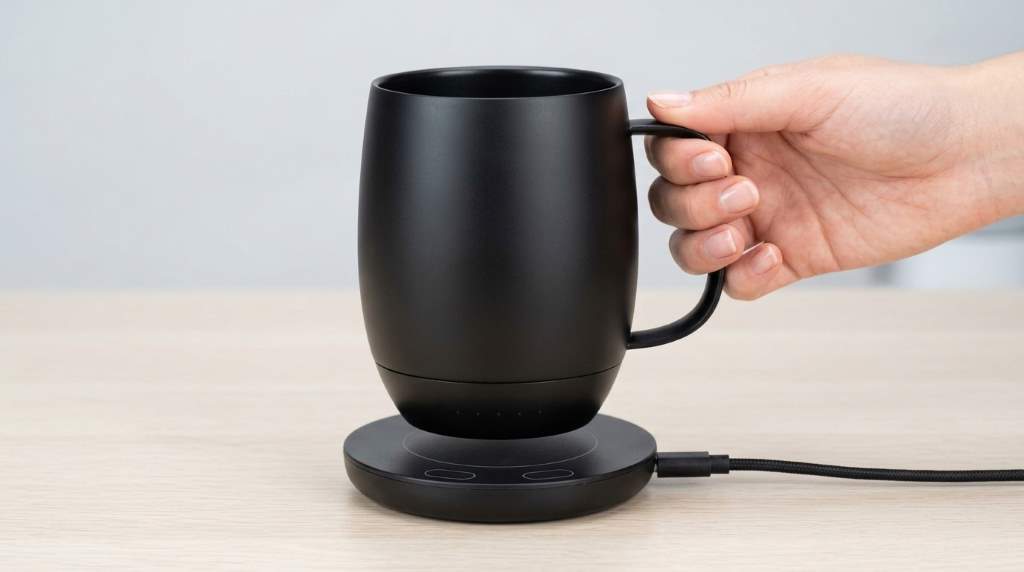
Using the Nextmug Self Heating Mug takes only a few simple steps. Charge the mug, add a hot beverage, then press the control button to set your temperature. The mug offers three settings: 130°F, 140°F, and 150°F. Its lithium ion battery can maintain heat while you drink away from the coaster.
If you want more details about the Nextmug Self Heating Mug, start by learning its basic controls. Then, follow the charging, heating, cleaning, and storage steps below.
Key Takeaways
- Charge the mug fully before your first extended use.
- Press the control button once for Warm at 130°F.
- Press twice for Hot at 140°F and three times for Piping at 150°F.
- Keep the mug on its docking coaster for continuous temperature maintenance.
- Use the lid when carrying the mug or drinking away from power.
- Hand wash the mug and keep its charging surfaces completely dry.
- Never microwave, submerge, or place the mug inside a dishwasher.
Understand How the Nextmug Works

The Nextmug combines a rechargeable battery, heating system, temperature controls, and charging coaster. Instead of reheating coffee repeatedly, the mug maintains your selected drinking temperature.
Unlike app controlled smart mugs, Nextmug uses a physical control button. Therefore, you can adjust the heat without pairing Bluetooth or opening a phone application.
The docking coaster serves two important purposes during everyday use. It charges the internal battery and lets the mug maintain its selected temperature continuously.
Know the Three Temperature Settings
| Setting | Temperature | Best Use |
|---|---|---|
| Warm | 130°F | Long coffee sessions and comfortable sipping |
| Hot | 140°F | Regular coffee and tea drinking |
| Piping | 150°F | People who prefer a noticeably hotter beverage |
These three settings cover most everyday hot beverage preferences. Nextmug recommends experimenting with each level until you find your preferred drinking temperature.
Charge the Mug Before Using It
Start by placing the docking coaster on a stable, dry surface. Connect the supplied power adapter, then place the mug securely onto the coaster.
The battery indicator lights show charging progress as the battery fills. When the available indicator lights remain solid, the mug has reached a full charge.
Before charging, always check that the mug base and docking coaster remain completely dry. Moisture around charging contacts can interfere with charging and may cause corrosion.
Why Full Charging Matters
A full battery gives you more flexibility when you move away from the coaster. However, higher temperature settings can require more heating power during use.
For desk use, keeping the mug on its coaster provides the simplest routine. You can then enjoy your drink without worrying about the battery running down during long work sessions.
Prepare Your Coffee or Tea
Next, pour your freshly prepared beverage into the mug. For best results, start with a beverage temperature at or above your selected setting.
The mug works by maintaining temperature rather than replacing a kettle or coffee maker. Therefore, extremely cold drinks may require more battery power to reach a hot setting.
Do not fill the mug beyond its intended capacity. Leaving some space also makes sipping safer and reduces the chance of accidental spills.
Turn On the Heating Function
Find the control button positioned directly beneath the Nextmug logo. Press it once to turn the mug on and activate the Warm setting at 130°F.
To increase the temperature, press the same button again. Each press moves the mug through the available settings in sequence.
- First press: Warm at 130°F.
- Second press: Hot at 140°F.
- Third press: Piping at 150°F.
- Fourth press: Turns the mug off.
This button sequence makes daily operation straightforward. Once you learn the four press cycle, you can change settings without checking an app or manual.
Read the Indicator Lights Correctly
The indicator lights help you understand the mug’s operating status. They provide information about temperature progress and remaining battery capacity.
During heating, the temperature indicator can pulse as the drink moves toward your selected setting. Once the beverage reaches the target temperature, the indicator changes to show temperature maintenance.
The battery indicator also helps you decide when to return the mug to its docking coaster. Therefore, check the lights before taking the mug away from its charging base.
What to Do When the Mug Takes Time to Heat
Do not assume the mug has stopped working simply because heating takes time. Beverage starting temperature, selected setting, volume, and battery level can affect the process.
First, confirm that the mug contains liquid and has enough battery power. Then, check whether you selected a higher temperature than necessary.
Use the Docking Coaster for Long Sessions
The docking coaster works especially well beside a computer, reading chair, or kitchen workspace. Keep the mug centered properly so its charging connection remains stable.
When you plan to sip throughout several hours, leave the mug docked whenever practical. This approach reduces battery dependence and supports continuous temperature maintenance.
However, avoid placing wet mugs onto the coaster. Dry both surfaces first, because moisture can affect charging connections over time.
Use the Mug Away From the Coaster
One major advantage of the Nextmug comes from its internal rechargeable battery. After charging, you can remove the mug from its coaster and continue drinking.
This setup works well when moving between rooms or working away from your desk. Still, battery operation works best when you monitor the battery indicator regularly.
Use the Lid for Better Heat Retention
The included spill resistant lid helps retain beverage temperature when the mug sits away from its coaster. It can also reduce accidental spills during ordinary movement.
Press the lid firmly into place before carrying the mug. However, treat it as spill resistant rather than completely leakproof.
Nextmug documentation also states that the lid can help maintain the selected temperature for several hours while undocked.
Use the Correct Temperature for Different Drinks
Your ideal temperature depends on the beverage and your personal drinking preference. Coffee often works comfortably around the Warm or Hot settings.
Tea drinkers may prefer different temperatures depending on the tea style and brewing method. Therefore, use the three presets as practical starting points rather than fixed rules.
Warm at 130°F
The Warm setting works well for slow coffee drinking. It provides a comfortable temperature without keeping the beverage extremely hot.
Hot at 140°F
The Hot setting offers a stronger balance between warmth and comfortable sipping. Many users may find this setting suitable for everyday coffee.
Piping at 150°F
The Piping setting suits people who prefer a noticeably hotter drink. Use extra caution because hot beverages can cause burns.
Understand the Automatic Shutoff
The Nextmug includes automatic shutoff features designed to reduce unnecessary heating. The system can detect when the mug contains no liquid and stop heating.
It can also shut down after extended inactivity under specified conditions. This feature helps prevent unnecessary battery use when you forget about the mug.
Still, automatic shutoff should not replace normal appliance habits. Turn the mug off manually whenever you finish using it for the day.
Clean the Nextmug Safely
Cleaning requires more care because the mug contains electronic components and a rechargeable battery. Hand wash the mug with warm water and mild soap after regular use.
Never submerge the mug in water or place it inside a dishwasher. Also, avoid getting the docking coaster or electrical connections wet.
After washing, dry the mug thoroughly before placing it back on the charging coaster. This simple habit protects the charging connection and helps maintain reliable operation.
How to Clean the Lid
The lid requires less restrictive cleaning because Nextmug states that its lids are dishwasher safe. You can also wash the lid manually when convenient.
If residue collects around the silicone ring, remove the ring and clean both the ring and its groove. Then reinstall the ring securely before using the lid again.
Avoid These Common Nextmug Mistakes
- Do not place the mug in a microwave.
- Do not put the mug inside a dishwasher.
- Do not submerge the mug in water.
- Do not place a wet mug on the charging coaster.
- Do not use third party charging accessories.
- Do not operate the mug with damaged electrical components.
- Do not treat the spill resistant lid as completely leakproof.
These mistakes can reduce performance or create unnecessary safety risks. Nextmug’s care guidance specifically warns against microwaving, dishwashing, and submerging the mug.
Make Your Daily Nextmug Routine Easier
A simple routine can make the mug more useful throughout your day. Start each morning with a charged mug, freshly prepared beverage, and your preferred temperature.
Then, keep the coaster nearby whenever you expect a long drinking session. If you move away, use the lid and monitor the battery indicator before continuing your work.
At the end of the day, wash the mug by hand and dry it completely. Finally, return it to the coaster when you want the battery ready for your next drink.
Nextmug Troubleshooting Checklist
| Problem | What to Check |
|---|---|
| Mug does not heat | Check battery level, liquid presence, and power setting. |
| Mug loses heat quickly | Check battery level and consider using the docking coaster. |
| Mug does not charge | Dry the mug base and coaster, then reseat the mug. |
| Temperature seems low | Check whether Warm, Hot, or Piping matches your preference. |
| Lights behave unexpectedly | Check the indicator pattern and consult the appropriate manual. |
If the mug still fails after basic checks, stop using it rather than attempting repairs yourself. Contact the manufacturer for product specific support when a fault continues.
How to Get Better Results Every Time
First, begin with a properly prepared hot beverage rather than expecting the mug to replace brewing equipment. Next, select the lowest temperature that keeps your drink enjoyable.
Also, use the coaster whenever you have access to a stable power source. This habit preserves battery capacity for situations where you actually need cordless use.
Finally, keep the mug and charging area clean and dry. Consistent care matters because electronic drinkware depends on reliable charging contacts.
Frequently Asked Questions
How do you turn on a Nextmug?
Press the control button once to turn on the mug and activate the 130°F Warm setting.
How do you make Nextmug hotter?
Press the control button again to select 140°F Hot or press it again for 150°F Piping.
Can you put Nextmug in the dishwasher?
No, hand wash the mug because its internal electronics require protection from dishwasher conditions.
Can you microwave a Nextmug?
No, never microwave the Nextmug because it contains electronic components and a rechargeable battery.
How long does Nextmug stay hot without the coaster?
A fully charged Nextmug can maintain temperature for hours, while the exact duration depends on use conditions.
Final Thoughts
Learning how to use a Nextmug becomes simple once you understand its button sequence. Charge it, add your hot drink, select Warm, Hot, or Piping, and let the mug maintain your chosen temperature.
For the best everyday experience, keep the coaster nearby and use the lid when you move around. Most importantly, hand wash the mug and keep every charging surface completely dry.
Start with the 140°F Hot setting if you want a practical middle ground. Then adjust the temperature based on how your coffee or tea tastes during your normal routine.