How to Replace Your Levoit Core 300 P Filter

Can a Leraze Glass Microwave Cover Stop Splatters?
August 16, 2026
Why You Need an LG LT1000P Filter for Your Fridge
August 16, 2026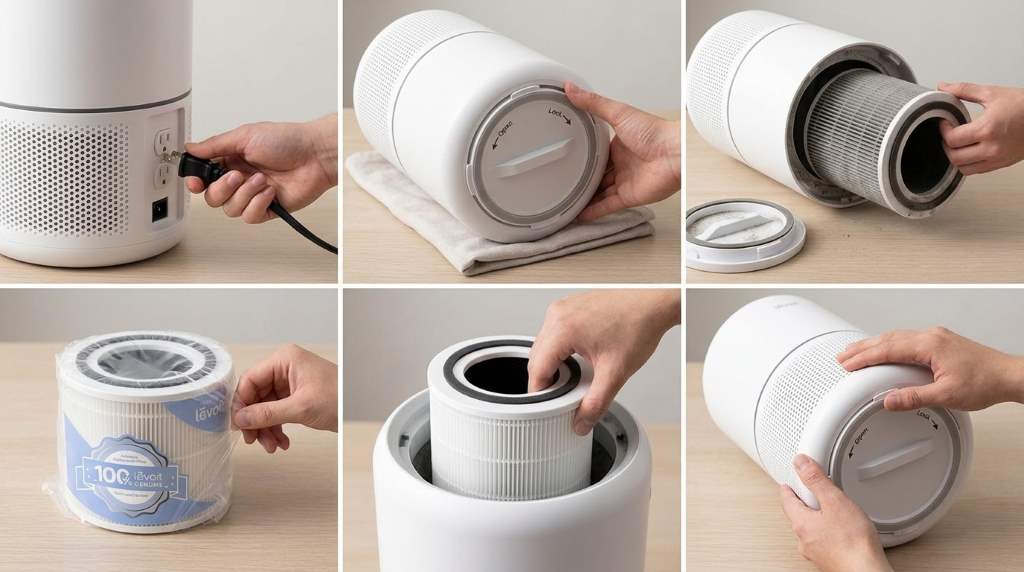
Replace your Levoit Core 300 P filter by unplugging the unit, removing the old filter, and installing a new one. Reset the filter indicator afterward, so the purifier tracks the next replacement correctly. Indoor air can hold several times more pollutants than outdoor air, while True HEPA filters capture 99.97% of particles measuring 0.3 microns. Therefore, using a fresh Levoit Core 300 P air purifier filter helps maintain strong cleaning performance and steady airflow.
Why Filter Replacement Matters
Your air purifier depends on clean airflow for effective performance. However, a clogged filter reduces efficiency and increases strain.
Dust, pet hair, and pollen gradually fill the filter media. Consequently, fresh air moves more slowly through the system.
Replacing the filter on time protects indoor comfort. It also helps maintain consistent filtration every day.
How the Levoit Core 300 P Filter Works
The Core 300 P uses a three stage filtration system. Each layer removes different types of airborne contaminants.
Pre Filter
The outer layer catches larger particles first. It traps lint, hair, and visible dust before deeper filtration begins.
True HEPA Filter
The middle layer handles fine airborne particles. It captures allergens, smoke particles, and other tiny contaminants.
Activated Carbon Layer
The final layer helps reduce odors and volatile compounds. Therefore, rooms often feel fresher after replacement.
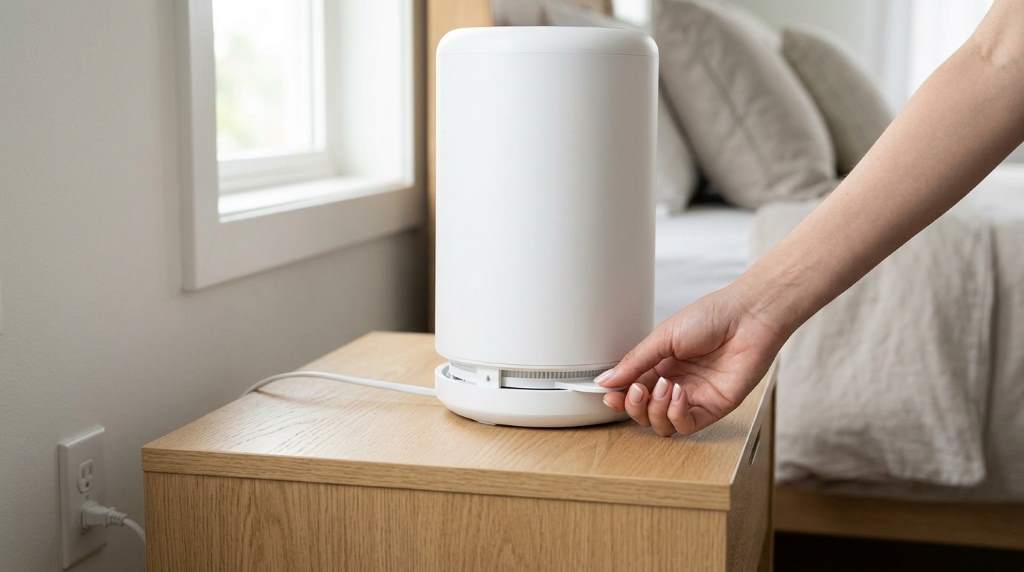
Signs Your Filter Needs Replacement
Your purifier usually provides clear replacement clues. Watch for these common signs before performance drops further.
- The filter indicator light stays on.
- Airflow feels weaker than usual.
- Dust returns quickly after cleaning.
- Pet odors linger longer.
- The purifier sounds louder during operation.
Ignoring these signs can reduce cleaning performance. Instead, replacing the filter promptly keeps results more consistent.
How Often Should You Replace the Filter?
Most households should replace the filter every six to eight months. However, actual timing depends on indoor conditions.
Homes with pets often need earlier replacement. Likewise, smoke exposure or heavy pollen can shorten filter life.
| Home Environment | Suggested Replacement Time |
|---|---|
| Average household | 6 to 8 months |
| Pet owners | 4 to 6 months |
| Smoke exposure | 3 to 5 months |
| Heavy allergy season | 4 to 6 months |
Checking the filter monthly prevents unexpected performance drops. Moreover, visual inspections help confirm replacement timing.
Tools You Need Before Starting
Fortunately, replacement requires almost no special equipment. Gather a few simple items before beginning.
- Replacement Levoit Core 300 P filter
- Clean microfiber cloth
- Vacuum with a brush attachment
- Clean, dry workspace
A prepared workspace keeps dust contained. As a result, installation becomes faster and cleaner.
Step by Step Guide to Replace Your Levoit Core 300 P Filter
Step 1: Turn Off the Air Purifier
Press the power button before touching the unit. Then unplug the purifier from the wall outlet.
This prevents accidental operation during replacement. Safety always comes first before maintenance begins.
Step 2: Open the Bottom Cover
Turn the purifier upside down carefully. Next, twist the bottom cover counterclockwise until it unlocks.
Lift the cover away gently after unlocking it. Avoid forcing the plastic parts during removal.
Step 3: Remove the Old Filter
Pull the cylindrical filter straight upward. Some dust may fall during removal, so work carefully.
Place the used filter inside a trash bag immediately. This helps contain trapped debris and allergens.
Step 4: Clean the Filter Chamber
Wipe the inside with a dry microfiber cloth. Then remove loose dust using a soft vacuum brush.
Never wash the chamber with excess water. Moisture can damage internal electrical parts.
Step 5: Prepare the New Filter
Remove all protective plastic before installation. Otherwise, the purifier cannot draw air properly.
Check that the filter matches the Core 300 P model. A correct fit prevents air leaks around the edges.
Step 6: Install the New Filter
Lower the new filter into the chamber carefully. It should sit evenly without tilting.
Replace the bottom cover afterward. Finally, twist it clockwise until it locks securely.
Step 7: Reset the Filter Indicator
Plug the purifier back into power first. Then hold the filter reset button for several seconds.
The indicator should turn off after resetting. Now the replacement cycle starts again.
Common Mistakes to Avoid
Small mistakes can reduce purifier performance. Fortunately, most are easy to prevent.
- Leaving protective plastic on the new filter.
- Installing the wrong filter model.
- Skipping the filter indicator reset.
- Washing the HEPA filter.
- Forcing the bottom cover closed.
Careful installation protects airflow and filtration quality. Therefore, taking an extra minute often prevents future problems.
Tips to Extend Filter Life
Good habits help every filter last longer. They also reduce unnecessary replacement costs.
- Vacuum the exterior vents monthly.
- Keep windows closed during high pollen days.
- Reduce indoor smoke exposure.
- Brush pet hair away regularly.
- Place the purifier away from blocked corners.
These simple habits improve airflow throughout the unit. Consequently, the filter stays cleaner for longer.
How to Dispose of the Old Filter
Used filters collect dust and allergens over time. Therefore, proper disposal keeps cleanup easier.
Seal the old filter inside a trash bag first. Then place it into normal household waste.
Avoid shaking the filter before disposal. Otherwise, trapped particles can return into the room.
How to Confirm the New Filter Works Properly
Run the purifier for several minutes after installation. Listen for smooth and steady operation.
Airflow should feel stronger than before replacement. Additionally, the filter indicator should remain off.
Check the bottom cover for a secure fit. A tight seal helps prevent unwanted air leaks.
When Replacement Solves Common Air Purifier Problems
Many performance issues improve after installing a fresh filter. Reduced airflow often returns to normal quickly.
Dust control usually becomes more consistent afterward. Likewise, odor reduction often improves noticeably.
However, unusual noises may need further inspection. Mechanical problems require different troubleshooting steps.
Conclusion
Replacing your Levoit Core 300 P filter takes only a few minutes, yet the results matter daily. Fresh filters restore airflow, improve particle capture, and help the purifier work more effectively.
Follow these simple steps whenever replacement becomes necessary. Then enjoy cleaner air with confidence and keep your purifier performing at its best.
Frequently Asked Questions
Can I wash my Levoit Core 300 P filter?
No, the HEPA filter should never be washed because water damages its filtration media.
How do I reset the filter light?
Hold the filter reset button for several seconds after installing the new filter.
Can I keep using the purifier with a dirty filter?
Yes, but performance drops and airflow becomes less effective.
Do I need genuine replacement filters?
A compatible filter designed for the Core 300 P ensures the proper fit and airflow.
Why does the purifier still smell after replacement?
Lingering odors may come from room sources instead of the new filter.